
Agents.md in GitHub Copilot: A Practical Guide to Creating Specialized Agents
GitHub Copilot introduces a key feature: the ability to define custom agents through the agents.md file. This allows you to move from a generic assistant to a team of virtual specialists, each with a clear role, commands, and boundaries.
Why is this so important? Because agents.md acts as the single source of truth: it defines the context, rules, and restrictions that enable each agent to behave like a true specialist. Without this file, Copilot would lack clear instructions, and the result would be inconsistent.
What is an agents.md and why does it matter?
An agents.md file defines how a custom agent should behave in GitHub Copilot. It serves as the single source of truth for each agent, specifying its role, context, and boundaries. Thanks to this file, Copilot stops being a generic assistant and becomes a team of virtual specialists.
Inside the file, you specify everything the agent needs to work correctly:
- Personality and tone: Communication style and approach.
- Technical context: Stack, frameworks, versions, and project structure.
- Commands: Actions it can execute (e.g.,
npm test --coverage). - Limits: What it must not touch, such as critical folders or secrets.
Why is it key? Because it provides task precision, style consistency, and control over scope. Each agent acts like a virtual team member with clear instructions and deep context.
Examples of agents:
- @docs-agent: Technical documentation expert.
- @test-agent: Testing and quality specialist.
- @security-agent: Security auditor.
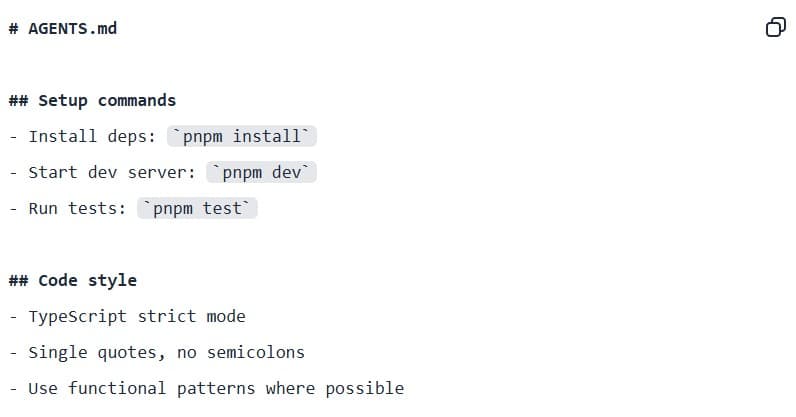
Keys to Making agents.md Work Effectively
After analyzing more than 2,500 agents.md files, GitHub has identified the factors that separate an effective agent from one that fails.
Key recommendations:
Include clear and complete commands
Place relevant commands early in the file (e.g., npm test, npm run build, pytest -v) and specify flags or options when important (such as npm test --coverage). This helps the agent execute critical tasks quickly and with less ambiguity.
Add practical code examples
A real snippet showing “what the result should look like” works better than explanatory paragraphs. Examples serve as direct references for the agent to mimic structure, syntax, and tone, producing more consistent outputs.
Define boundaries and security rules
The rule “Never commit secrets” is the most common and effective to prevent AI from accessing sensitive elements like secrets, vendor folders, or production configs. Setting these restrictions upfront reduces security risks and ensures the agent works only in safe, relevant areas.
Specify the stack precisely
Saying “React 18 with TypeScript, Vite, and Tailwind CSS” is far more useful than “React project.” Specificity allows the agent to generate code and tests tailored to your exact environment, avoiding incompatibilities.
Cover the six essential areas
A complete file should include:
- Commands
- Testing
- Project structure
- Code style
- Git workflow
- Clear boundaries
These areas provide technical context, examples, and rules that ensure quality and security.
Conclusion
Defining a solid agents.md not only improves developer efficiency but also drives a broader strategy of automation and intelligent collaboration.
At Itequia, we help companies integrate tools like GitHub Copilot into their development processes, creating environments that boost productivity and minimize errors. Our goal is to design workflows that are more agile, secure, and tailored to your needs. Want to embrace more efficient development? Contact us and tell us about your project.