
API Versioning: A Complete Guide to .NET Best Practices and Compatibility

Creating and managing APIs is an essential part of modern software development. One of the key considerations in this process is how to handle API versioning effectively. In the .NET ecosystem, there are several strategies and best practices you can follow to ensure that your API is maintainable, extensible and compatible over time.
What is API Versioning?
API versioning refers to the practice of managing changes to an API so that current users continue to use the existing version while new functionality or enhancements are introduced. This process is crucial for maintaining compatibility, ensuring that applications and services that depend on the API do not break with new updates.
Reasons to Implement API Versioning
- Backwards compatibility: ensures that existing applications continue to work even as the API evolves.
- Flexibility in evolution: allows developers to add new functionality or make major changes without affecting existing users.
- Simplified maintenance: facilitates the maintenance of multiple versions of the API, each tailored to the needs of different user groups.
What are the different API Versioning Strategies in .NET?
In .NET, there are several common strategies for implementing API versioning. Each with its own advantages and disadvantages:
Versioned in the URL
This is the most common and straightforward approach, where the API version is included in the endpoint URL. For example:

Advantages:
- Easy to implement and understand.
- Visible on the road, allowing customers to quickly identify which version they are using.
Disadvantages:
- Can lead to messy URLs as versions increase.
- Not ideal if a large number of versions are expected.
How is the Configuration in .NET 8 in the URL?
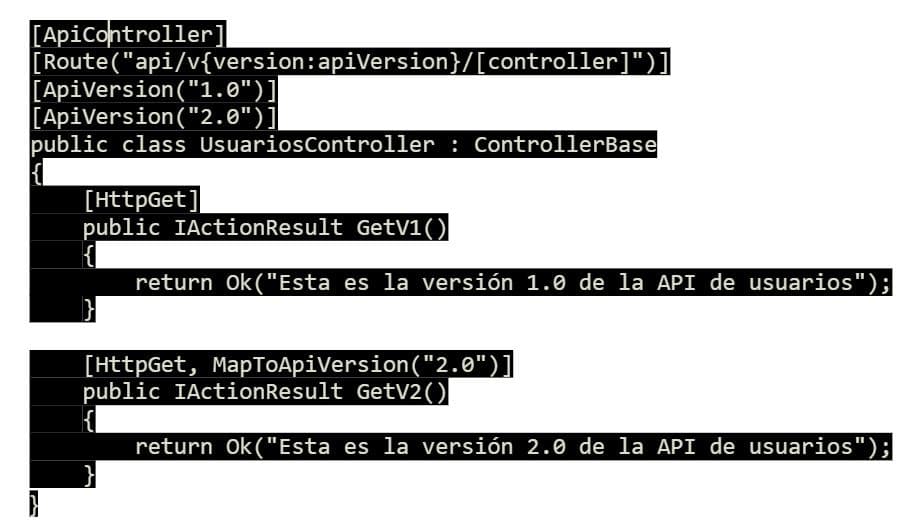
Versioned in the Header
Instead of including the version in the URL, it can be specified in a custom HTTP header:

Advantages:
- Keeps URLs clean and consistent.
- Facilitates API evolution without changes to URL structure.
Disadvantages:
- May be less obvious to developers unfamiliar with the API.
- Changes to headers may require additional configuration on some HTTP clients.
all Configuration keys in .NET 8 for header versioning
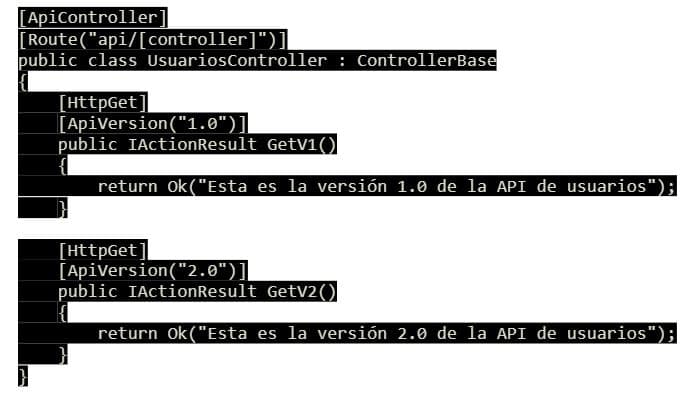
In the configuration of services in Program.cs:
Versioning via Query Parameters
Another option is to include the version in the query string parameters:
Advantages:
- Flexible and easy to modify.
- No changes to URL structure or headers are required.
Disadvantages:
- Can make URLs look messy.
- Not as intuitive as the URL version.
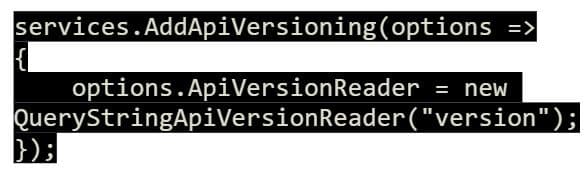
.NET 8 configuration for query string versioning
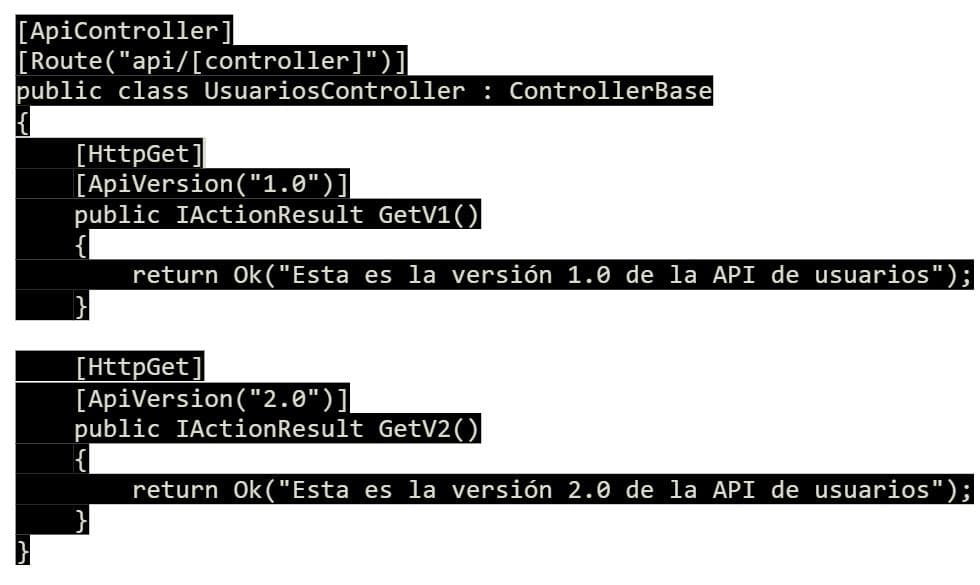
Regarding the configuration of services in Program.cs:
Versioning via Media Types (Content Negotiation)
In this approach, the version is specified in the Accept header as part of the media type:

Advantages:
- Very flexible and allows customers to request the exact version they need.
- Useful in APIs that serve multiple content types.
Disadvantages:
- Can be complex to implement and maintain.
- Not intuitive for all developers.
Configuration in .NET 8 for versioning via Media Types
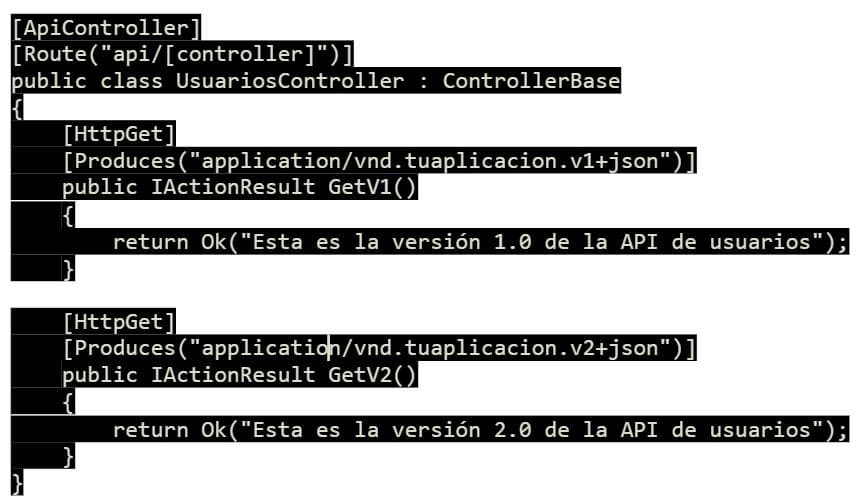
In the configuration of services in Program.cs:

What are the best practices for API versioning in .NET?
- Plan Ahead
API versioning is easier to manage when it is planned from the beginning. Before launching your API, consider how future versions will be handled and what versioning strategy you will use.
- Clear Documentation
Provide clear and detailed documentation for each version of your API. Users should be able to easily understand what versions are available, what changes have been made to each version and how to migrate between versions.
- Backwards Compatibility
It is crucial to maintain backwards compatibility as much as possible. Breaking changes should be introduced in a new version, and users should be given sufficient time and resources to migrate.
- Deprecation of Old Versions Gradually
When an API version becomes obsolete, implement a clear process for deprecation. Inform users in advance and offer support for migration to newer versions.
- Test Automation
Incorporate automated tests that cover all versions of the API you are maintaining. This ensures that changes in one version do not adversely affect other versions.
Implementing API Versioning in .NET
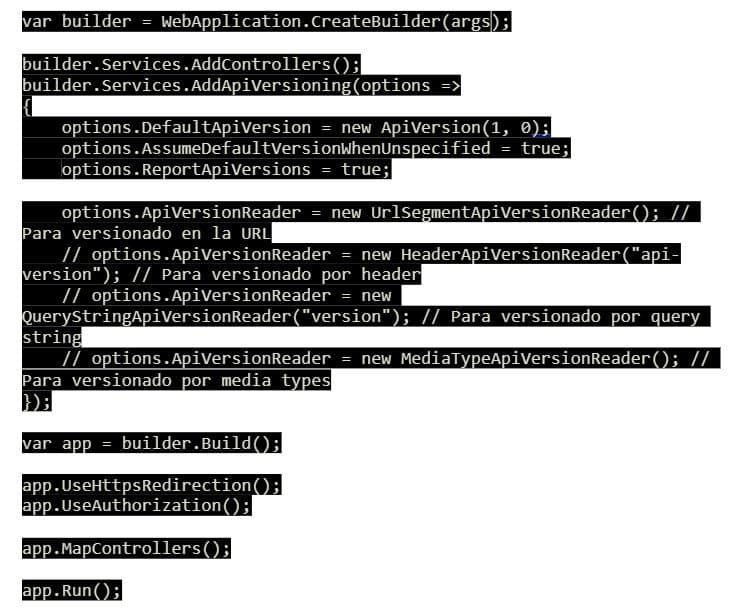
.NET 8 provides extensive support for API versioning through the Microsoft.AspNetCore.Mvc.Versioning package. This package facilitates the implementation of different versioning strategies, including versioning by URL, headers, query string and media types.
Example of General Configuration:
Conclusions
API versioning is an essential practice for long-term software development. By implementing a proper versioning strategy in .NET 8, you can ensure that your API is flexible, maintainable and compatible with future evolutions. The code samples provided show how to implement these strategies in .NET 8, which will help you manage the lifecycle of your APIs effectively.