
How does automatic API documentation work with OpenAPI and Scalar?
Finding outdated documentation is one of the most common frustrations in modern software development. It’s not that developers hate documentation itself, but rather the traditional process of documenting. Writing code is a creative and dynamic act, while drafting manuals is perceived as tedious administrative work. This, combined with the frantic pace of agile methodologies — where the priority is delivering functional code and fixing bugs — means documentation always ends up as the last priority. Constantly pushed aside by more immediate deliverables.
The consequences are tangible. Developers waste hours resorting to trial and error to figure out how an API works. For example: testing parameters, changing request formats and deciphering error codes without any context. A task that should take two hours can end up taking two days. Simply because the developer spent that time investigating why the API wasn’t responding as expected.
OpenAPI: a standard to end the chaos
The root of the problem is always the same. Documentation lives separately from the code. A PDF or a Wiki is outdated the moment someone changes a field in the backend and forgets to update the document. OpenAPI solves this at its core. It is a standard specification for describing RESTful APIs that allows you to write the instruction manual of an API in a text file. What routes exist, what parameters it receives and what responses it returns. If the API changes, the file changes and the documentation updates instantly.
But OpenAPI doesn’t just keep documentation in sync. It also allows testing tools to read that file and automatically verify whether the API is behaving as the documentation states. Without the need to write tests manually for every change. And beyond test automation, that same file can become something far more useful than a static document. Tools like Swagger UI read it and generate an interactive web page with the list of endpoints, HTTP methods, parameters and server response codes. This is where developers can consult and test the API in real time. It’s a qualitative leap compared to the usual PDF. However, Swagger UI has a clear limitation: its design has aged poorly. The vertical list with accordion effect becomes overwhelming in large APIs. The user experience also leaves much to be desired.
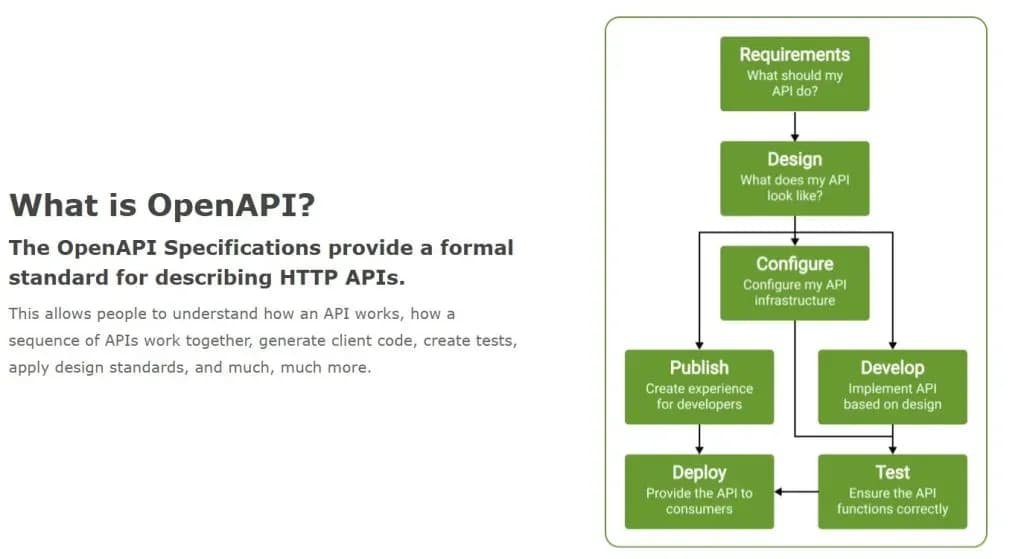
Lifecycle of an API according to the OpenAPI Initiative: from requirements to deployment and testing.
Scalar: the evolution of interactive documentation
Scalar was born precisely to solve what Swagger UI doesn’t: the developer experience. It offers a modern three-column interface (navigation on the left, documentation in the center and a testing client on the right) that makes navigating a large API immediate and clear. It also incorporates an integrated REST client that works practically like a mini Postman within the documentation itself. Much more complete than Swagger UI’s.
The choice between the two depends on the context. Swagger UI remains valid for more conservative environments or with specific technical constraints. If the priority is developer experience and product image, Scalar wins clearly. In any case, they share one limitation. Both are the right solution for RESTful APIs. But not for GraphQL, WebSockets or real-time streaming architectures, where specific alternatives need to be evaluated.
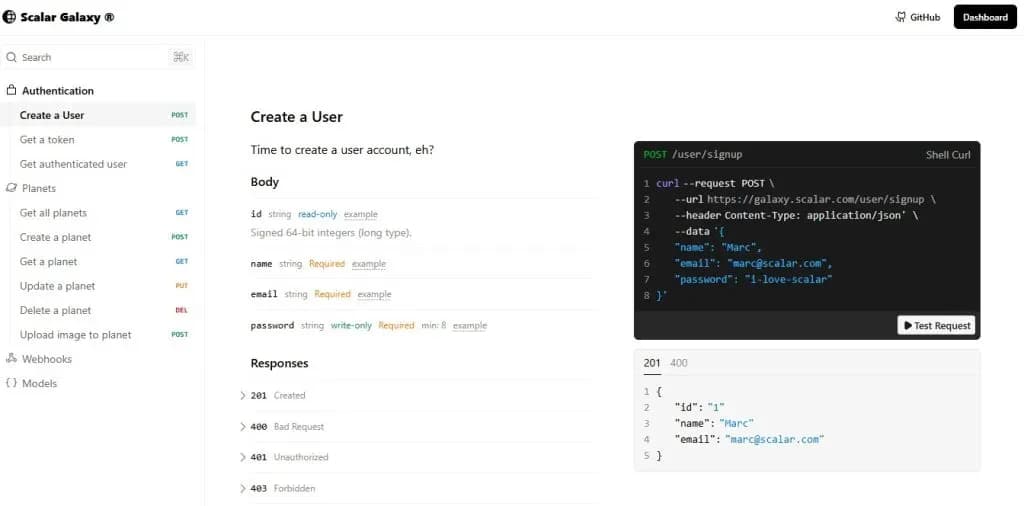
Scalar interface: documentation, parameters and integrated REST client on a single screen.
From code to published documentation: where AI comes in and how we use it
In the traditional workflow, developers write API functions using decorators or structured comments in their framework. At compile time, the framework automatically generates an openapi.json file that Scalar reads to render the documentation in real time. Documentation stops being a separate task and becomes a natural consequence of development. However, there is an important nuance that is often overlooked. Without active intervention, the only thing that gets automatically documented is the variable name and its type. Technically valid documentation, but one that provides no real value to whoever needs to integrate or maintain that API.
This is where AI makes the difference, and where how it is used determines the outcome. At Itequia, the use of AI in API documentation is not limited to speeding up code writing. What we do is analyze the existing code and documentation to identify all undocumented or outdated endpoints, and update them systematically.
This analysis includes not only the types of each field, but also:
- What each field does functionally.
- Why a particular calculation is performed.
- What values are hardcoded and the rationale behind them (especially relevant in legacy systems, where magic numbers are common and rarely have any written explanation).
- What permissions are associated by role. In this way, documentation stops being a type inventory and becomes a resource that genuinely helps people understand and work with the API.
In addition to reviewing existing code, we incorporate a specific step in the workflow to keep that documentation continuously up to date. When any change to an endpoint is detected — whether through a CI/CD pipeline or through the definition of a workflow in the development itself — the documentation is updated automatically. This ensures that the gap between code and documentation never reappears over time.
Documentation with identity: templates tailored to each client
Well-generated documentation from a technical standpoint can still be difficult to use if it hasn’t been designed with the end user in mind. That’s why at Itequia we propose and develop custom templates for each client, giving them control over what information they want to expose in their documentation, in what format and with what level of detail. These templates are reusable across projects and are versioned to adapt to the specific needs of each team or product. In practice, it is a capability that can be applied to almost any project and turns documentation into an asset that is coherent with each organization’s image and standards.
Where to start?
The starting point is simpler than it seems. Most modern frameworks such as FastAPI, NestJS or Spring Boot, with the right libraries, can automatically generate the openapi.json file from the annotations or endpoint definitions in the code. With that file generated, integrating Scalar takes just minutes.
The next step is to incorporate OpenAPI specification validation into the CI/CD pipeline, and to define at what points in the development process AI intervenes to enrich that documentation. Because the actual level of automation depends directly on when and how AI is involved. If it is part of the development or review of every change, documentation is maintained almost autonomously. If not, the result will be correct but superficial.
At Itequia we can review how your team is managing API documentation and show you how to automate it with OpenAPI, Scalar and AI. We offer a free initial review where we analyze your current workflow and show you what can be automated and in how long. Get in touch and tell us about your case.
Francesc Juventeny Corberó – Digital Transformation Analyst at Itequia