
How to generate a DDM strategy in your company

When defining a security policy for an application, one of the most common challenges is limiting unauthorized access to sensitive information.
For example, you may want your Marketing staff to have full access to all customer and prospect information. But, your Finance department to only be able to access information pertaining to collections, or your managers to only be able to search for their accounts.
If you’ve ever worked with SQL Server at Microsoft, you’ve probably had to define what information your different departments have access to or the ability to edit it.
Today, these techniques are known as Data Masking. An especially useful and accessible technique for all types of companies thanks to Dynamic Data Masking.
What is the DDM?
Dynamic Data Masking (hence its acronym DDM) is a technique to protect sensitive information from unwanted eyes. It allows you to specify the extent of data accessible for a user without the necessary permissions.
The DDM has the advantage that can be applied at any time. Even with an application that is already running, without the need to change any existing settings or action orders.
What data should you hide from outside eyes?
The four most common types of data that you want to keep secret are:
Personally Identifiable Information (PII)
The data that can be used to identify certain profiles. Include full names or personal document numbers (DNI, driver’s license and Social Security, among others).
Protected Health Information (PHI)
Data collected by health service providers, private or public, to identify the necessary treatments. It includes insurance information, demographics, test results, and medical records.
Payment Card Information
The information we give to online stores when making a purchase from the web. It falls within the Payment Card Industry Data Security Standard (PCIDSS) to ensure the security of cardholder data.
Intellectual Property (IP)
the information related to inventions, business plans, designs and construction plans. These are highly valuable to a business and must be protected against theft and unauthorized access.
What alternatives do we have to this exhibition?
There are actually three common types of data masking within data libraries:
- Static Data Masking: A duplicate version of the data is created that contains partially or completely masked information. Both versions are kept in different locations.
- On the fly Data Masking: modifies sensitive information during its transfer between different environments to ensure that it reaches the receiver safely. More recommended for companies that operate under Continuous Integration.
- Dynamic Data Masking, which we have already talked about before.
One of the solutions that we would recommend in the event that the database engine used by the application is SQL Server (very common in all types of sectors) would be the use of Dynamic Data Masking available in SQL Server in its SQL versions Server 2016 (13.x) and later such as Azure SQL Database, Azure SQL Managed Instance, and Azure Synapse Analytics.

How do we enable DDM on a column?
To enable this feature we only have to define a mask based on the data type of the column.
This mask is created in the column definition itself in T-SQL by applying a function that returns a masked value instead of the actual value of the column:
Function
Datatype
Description
T-SQL Column definition
Default()
All
Applies a default value to all columns, depending on the data type:
String to xxx
Numeric to 0
Date and Time: 01.01.1900 00:00:00
Telephone varchar(20) MASKED WITH (FUNCTION = ‘default()’)
Email()
String
Return the first letter of the value by adding the following pattern:{P}[email protected]
Email varchar(100) MASKED WITH (FUNCTION = ’email()’)
Partial
String
Return the first N characters and the last N characters applying a padding:
Rxxxxxxxo
Surnames varchar(100) MASKED WITH (FUNCTION = ‘partial(1, “xxxxxx”, 1)’)
Random
Numeric
Returns a random value within an interval
Gross Salary decimal (18,2) MASKED WITH (FUNCTION = ‘random(1,999999)’)
Datetime
(1)
Date and Time
Mask the part of the day that is required:
Year at datetime (“Y”)
Month at datetime (“M”)
Date at datetime (“D”)
Datetime time (“h”)
Minute to datetime (“m”)
Second to datetime (“s”)
(1) Only available in Sql Server 2022
DateofBirth ADD MASKED WITH (FUNCTION = ‘datetime(“M”)’)
Permit Management
DDM has the option to grant different levels of permissions to view the unmasked values with different granularities: Database, Schema, Table and even column:
Level | T-SQL |
Database | GRANT UNMASK TO {User}; |
Schema | GRANT UNMASK ON SCHEMA::{Schema} TO {User} |
Table | GRANT UNMASK ON {Schema.Table} TO {User}; |
Column | GRANT UNMASK ON {Schema.Table}(Column) TO {User} |
- It must be taken into account that the UNMASK permission does not grant Read permissions by itself, the user must also have the SELECT permission to be able to view any value, as well as highlighting that a user without UNMASK permission but with UPDATE could update a masked column.
How do we apply the DDM in Azure?
In the Azure portal, within the options menu for managing a SQL Server database, we have the option ‘Dynamic data masking’. It allows us to carry out in a very simple way the administration of the masks for any existing column, without having to know the T-SQL syntax that we have seen previously:
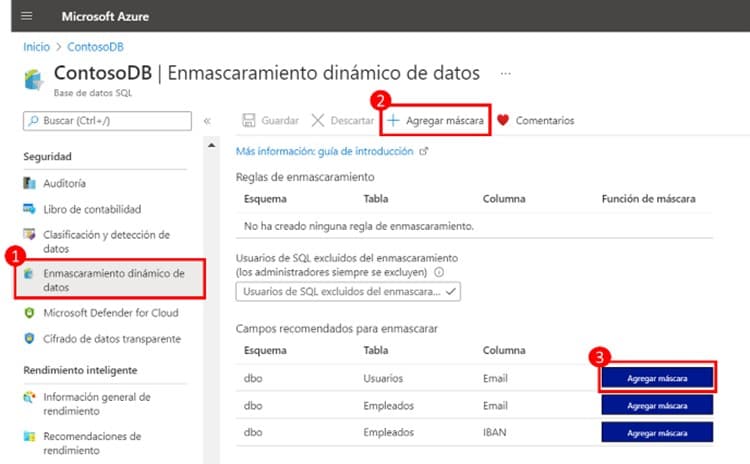
- (1) DDM Management Option within the Database in Azure.
- (2) Action to create a mask on any of the existing columns.
- (3) Columns suggested as candidates for masking with the option to create a mask for them.
When clicking on the action (2) ‘Add mask’, Azure will present us with a screen where we can create the mask by previously selecting the Schema, Table and Column. Action (3) will display the same screen preselecting the previous values, starting from the suggested column.
On the screen we will finally be presented with the list of available formats depending on the data type of the column:
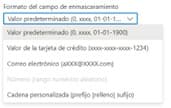
Azure Masking Predefined Format Types:
Format Type | Data Type | Display |
Default value | All | |
Credit card | String | |
String | ||
Random range | Numeric | |
Custom chain | String |
How do you put a DDM into action?
Let’s observe a aDDM’s example with all the examples that we have described in the previous table
First, we create the Employees table; masking the different columns we have seen:
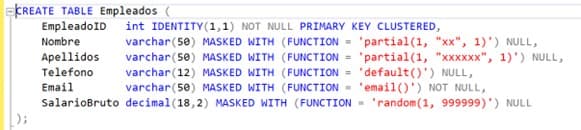
A user with SELECT and UNMASK permission on that table would obtain the following values:
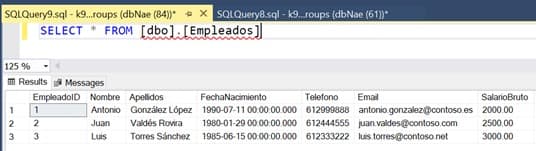
On the other hand, a user with SELECT permission, but without UNMASK permission, would obtain the same rows, but with masked values in each of the columns defined with dynamic mask, applying the established masking function to each column:
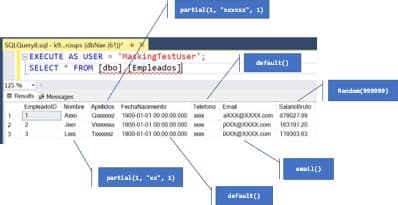
Here we leave you the same example described in text with the most important parts highlighted
CREATE TABLE Employees (

EmployeeID int IDENTITY(1,1) NOT NULL PRIMARY KEY CLUSTERED,

Name varchar(50) MASKED WITH (FUNCTION = 'partial(1, "xx", 1)') NULL,

Surname    varchar(50) MASKED WITH (FUNCTION = 'partial(1, "xxxxxx", 1)') NULL,

Telephone     varchar(12) MASKED WITH (FUNCTION = 'default()') NULL,
Email        varchar(50) MASKED WITH (FUNCTION = 'email()') NOT NULL,

INSERT INTO Employees (Name, Surname, Telephone, Email, GrossSalary)

VALUES

('Antonio', 'González López', '612999888', '[email protected]', 2000),

('Juan', 'Valdés Rovira', '612444555', '[email protected]', 2500),

('Luis', 'Torres Sánchez', '612333222', '[email protected]', 3000)

CREATE USER MaskingTestUser WITHOUT LOGIN;

GRANT SELECT ON SCHEMA::dbo TO MaskingTestUser;

EXECUTE AS USER = 'MaskingTestUser';

SELECT * FROM dbo.Employees

CREATE TABLE Employees

(

UserID int IDENTITY(1,1) NOT NULL PRIMARY KEY CLUSTERED,

Name varchar(50) NULL,

Surname varchar(50) NULL,

Telephone varchar(12) NULL,

Email varchar(50) NOT NULL,

DateBirth datetime NULL,

IBAN varchar(50) NULL,

GrossSalary decimal(18,2) NULL

);

INSERT INTO Employees (Name, Surname, Telephone, Email, DateBirth, IBAN, GrossSalary)

VALUES

('Antonio', 'González López', '612999888', '[email protected]', '1990-07-11', 'ES0220958524201618721727', 2000),

('Juan', 'Valdés Rovira', '612444555', '[email protected]', '1980-01-29', 'ES6320804148384145618563', 2500),

('Luis', 'Torres Sánchez', '612333222', '[email protected]', '1985-06-15', 'ES9201826168304876446786', 3000)
What benefits does the DDM give?
To finish, we can comment on some advantages of the DDM that we have seen throughout the article:
- Minimizes the exposure of sensitive information to users without permission
- Improves the configuration of databases with protected information by eliminating its manipulation
- Offers partial or complete hiding of textual and numeric data with random functions
- Strengthen the data protection policies in your company, encouraging the individual and group responsibility of your workers
- Offer agility and transparency to the management of your application keeping the data intact
It is also important to clarify that dynamic masking used in isolation does not fully guarantee the protection of confidential information. It is recommended to use tools to properly manage permissions in the database, always applying the principle of granting the minimum required permissions, enabling other security mechanisms such as Audit and Encryption.
If you want to know more about how to take advantage of your DDM techniques within Microsoft suites, contact us.